Create Table Homo_Sapiens

Create Table is a basic statement in the SQL language which is the most widespread computer language used when structuring data in databases.

The most common entity in databases around must be rows representing real world human beings (Homo Sapiens) and the different groups we form. Tables for that could have the name Homo_Sapiens but is usually called Customer, Member, Citizen, Patient, Contact and so on.

The most common data quality issues around is related to accuracy, validity, timeliness, completeness and not at least uniqueness with the data we hold about people.

In databases tables are supposed to have a unique primary key. There are two basic types of primary keys:

  • Surrogate keys are typically numbers with no relation (and binding) to the real world. They are made invisible to the users of the applications operating on the database.
  • Natural keys are derived from existing codes or other data identifying an entity in the real world or made for that purpose. They are visible to users and part of electronic, written and verbal communication.

As surrogate keys obviously don’t help with real world uniqueness and there are no common global natural key for all human beings on the earth we have a challenge in creating a good primary key for a Homo Sapiens table.

Inside a given country we have different forms of citizen ID’s (national identification number) with very varying terms of use between the countries. But even in Scandinavia where I live and we have widespread use of unique citizen ID’s most tables that could have the name Homo_Sapiens cannot use a Citizen ID as (unique) primary key for several reasons as well as that data is not present in a lot of situations.

Most often we name the tables holding data about human beings by the role people will act in within the purpose of use for the data we collect. For example Customer Table. A customer may be an individual but also a household or a business entity. A human being may be a private consumer but also an employee at a business making a purchase or a business owner making both private purchases and business purchases.

Every business activity always comes down to interacting with individual persons. But as our data is collected for the different roles that individual may have acted in, we have a need for viewing these data related to single human beings. The methods for facilitating this have different flavours as:

  • Deduplication is the classic term used for describing processes where records are linked, merged or purged in order to make a golden copy having only one (parent) database row for each individual person (and other legal entities). This is usually done by matching data elements in internal tables with names and addresses within a given organisation.
  • Identity Resolution is about the same but  – if a distinction is considered to exist – uses a wider range of data, rules and functionality to relate collected data rows to real world entities. In my eyes exploiting external reference data will add considerable efficiency in the years to come within deduplication / identity resolution.
  • Master Data Hierarchy Management again have the same goal of establishing a golden copy of collected data by emphasising on reflecting the complex structure of relationships in the real world as well as the related history.

Next time I am involved in a data modelling exercise I will propose a Homo_Sapiens table. Wonder about the odds for buy in from other business and technical delegates.


Bookmark and Share

A New Year Resolution

Also for this year I have made this New Year resolution: I will try to avoid stupid mistakes that actually are easily avoidable.

Just before Christmas 2009 I made such a mistake in my professional work.

It’s not that I don’t have a lot of excuses. Sure I have.

The job was a very small assignment doing what my colleagues and I have done a lot of times before: An excel sheet with names, addresses, phone numbers and e-mails was to be cleansed for duplicates. The client had got a discount price. As usual it had to be finished very quickly.

I was very busy before Christmas – but accepted this minor trivial assignment.

When the excel sheet arrived it looked pretty straight forward. Some names of healthcare organizations and healthcare professionals working there. I processed the sheet in the Omikron Data Quality Center, scanned the result and found no false positives, made the export with suppressing merge/purge candidates and delivered back (what I thought was) a clean sheet.

But the client got back. She had found at least 3 duplicates in the not so clean sheet. Embarrassing. Because I didn’t ask her (as I use to do) a few obvious questions about what will constitute a duplicate. I have even recently blogged about the challenge that I call “the echo problem” I missed.

The problem is that many healthcare professionals have several job positions. Maybe they have a private clinic besides positions at one or several different hospitals. And for this particular purpose a given healthcare professional should only appear ones.

Now, this wasn’t a MDM project where you have to build complex hierarchy structures but one of those many downstream cleansing jobs. Yes, they exist and I predict they will continue to do in the decade beginning today. And sure, I could easily make a new process ending in a clean sheet fit for that particular purpose based on the data available.

Next time, this year, I will get the downstream data quality job done right the first time so I have more time for implementing upstream data quality prevention in state of the art MDM solutions.

Bookmark and Share

What’s in an eMail Address?

When you are deduping, consolidating or doing identity resolution with party master data the elements that may be used includes names, postal addresses and places, phone numbers, national ID’s and eMail addresses.

Types of eMail addresses

In this post I will look closer into eMail addresses based on a general list of types of party master data.

You may divide eMail addresses into these types:

CONSUMER/CITIZEN:

This is a private eMail address belonging to an individual person.

Typical formats are myname@hotmail.com and nickname@gmail.com and name123@anymail.com

You may change your eMail address as a private person as time goes or have several such addresses at a time depending on your favourite providers of eMail services and other reasons to split your personality.

HOUSEHOLD:

A household/family may choose to have a shared eMail Address for private use.

Typical format will be xyz-family@anymail.com where the word family of course could be in a lot of different languages like famiglia-italiano@email.it

A special usage is the GROUP where two (or more) names are included like mary-and-john@anymail.com

EMPLOYEE:

This is the eMail address you are assigned as an employee (including owner) at a company.

Common formats are abc@company.com and name.name@company.com

When you change employer you also change eMail address and you may have several employers or other assignments at the same time. Also different formats like initials and full name may point to the same inbox.

DEPARTMENT:

Here the eMail address is not pointed at a particular person but some sort of a team within a company.

Formats are like sales@company.com and salg@firma.dk and vertrieb@firma.de choosing the sales team in some different languages.

Some eMail are referring to a specific FUNCTION like webmaster@company.com

BUSINESS:

This is an eMail address for the entire company.

Most common formats are info@company.com and company@company.com

INVALID:

Often a field designed for an eMail address is populated with invalid values going from obvious wrong values like XXX to harder detectable syntax errors and not existing domains.

Real world duplication

Many online services are based on registration via an eMail address assuming that one eMail represents one real world entity which of course is not the case.

Even on a service like LinkedIn where you may attach several eMail addresses to one profile you do encounter persons with obvious duplicate profiles.

Multi-channel marketing and sales

An increasing number of organisations are doing both offline and online operations today and when building enterprise wide master data hubs the eMail address becomes an more and more important element in matching party master data.

In such matching activities the eMail address can not stand alone but must be combined with the other elements as names, postal addresses, phone numbers and national ID’s upon availability.

Success in automating such processes is based on advanced algorithms in flexible and configurable solutions.

Comment or eMail me

If you also have been battling here I will be glad to have your comments here or by mail. My mail is hlsgr@mail.tele.dk and hls@omikron.net and hls@locus.dk and hls@dmpartner.dk and nordic@omikron.net

Bookmark and Share

Splitting names

When working through a list of names in order to make a deduplication, consolidation or identity resolution you will meet name fields populated as these:

  • Margaret & John Smith
  • Margaret Smith. John Smith
  • Maria Dolores St. John Smith
  • Johnson & Johnson Limited
  • Johnson & Johnson Limited, John Smith
  • Johnson Furniture Inc., Sales Dept
  • Johnson, Johnson and Smith Sales Training

SplitSome of the entities having these names must be split into two entities before we can do the proper processing.

When you as a human look at a name field, you mostly (given that you share the same culture) know what it is about.

Making a computer program that does the same is an exiting but fearful journey.

What I have been working with includes the following techniques:

  • String manipulation
  • Look up in list of words as given names, family names, titles, “business words”, special characters. These are country/culture specific.
  • Matching with address directories, used for checking if the address is a private residence or a business address.
  • Matching with business directories, used for checking if it is in fact a business name and which part of a name string is not included in the corresponding name.
  • Matching with consumer/citizen directories, used for checking which names are known on an address.
  • Probabilistic learning, storing and looking up previous human decisions.

As with other data quality computer supported processes I have found it useful having the computer dividing the names into 3 pots:

  • A: The ones the computer may split automatically with an accepted failure rate of false positives
  • B: The dubious ones, selected for human inspection
  • C: The clean ones where the computer have found no reason to split (with an accepted failure rate of false negatives)

For the listed names a suggestion for the golden single version of the truth could be:

  • “Margaret & John Smith” will be split into CONSUMER “Margaret Smith” and CONSUMER “John Smith”
  • “Margaret Smith. John Smith” will be split into CONSUMER “Margaret Smith” and CONSUMER “John Smith”
  • “Maria Dolores St. John Smith” stays as CONSUMER “Maria Dolores St. John Smith”
  • “Johnson & Johnson Limited” stays as BUSINESS “Johnson & Johnson Limited”
  • “Johnson & Johnson Limited, John Smith” will be split into BUSINESS “Johnson & Johnson Limited” having EMPLOYEE “John Smith”
  • “Johnson Furniture Inc., Sales Dept” will be split into “BUSINESS “Johnson Furniture Inc.” having “DEPARTMENT “Sales Dept”
  • “Johnson, Johnson and Smith Sales Training” stays as BUSINESS “Johnson, Johnson and Smith Sales Training”

For further explanation of the Master Data Types BUSINESS, CONSUMER, DEPARTMENT, EMPLOYEE you may have a look here.

Bookmark and Share

Mu

muThe term ”Mu” has several meanings including being a lost continent. In this post I will use the meaning of “mu” being the answer to a question that can’t be answered with a simple “yes” or “no” or even “unknown” as explained on Wikipedia here.

When working with data quality you often encounter situations where the answer to a simple question must be “mu”.

Let’s say you are looking for duplicates in a customer file and have these two rows (Name, Address, City):

Margaret Smith, 1 Main Street, Anytown
Margaret & John Smith, 1 Main Street, Anytown

Is this a duplicate situation?

In a given context like preparing for a direct mail the answer could be “yes”. But in most other contexts the answer is “mu”. Here the question should be something like: How do you handle hierarchy management with these two rows? And the answer could be something like the process presented in my recent post here.

Similar considerations apply to this example (Name, Address, City):

One Truth Consultants att: John Smith, 3 Main Street, Anytown
One Truth Consultants Ltd, 3 Main Street, Anytown

And this (Contact, Company, Address, City):

John Smith, One Truth Consultants, 3 Main Street, Anytown
John Smith, One Truth Services, 3 Main Street, Anytown

The latter example is explained in more details in this post.

Bookmark and Share

Settling a Match

In a recent post on this blog we went trough how a process of consolidating master data could involve a match with a business directory.

Having more than a few B2B records often calls for an automated process to do that.

So, how do you do that?

Say you have a B2B record as this (Name, HouseNo, Street, City):

  • Smashing Estate, 1, Main Street, Anytown

The business directory has the following entries (ID, Name, HouseNo, Street, City):

  • 1, Smashing Estates, , Central Square, Anytown
  • 2, Smashing Holding, 1, Main Street, Anytown
  • 3, Smashing East, 1, Main Street, Anytown
  • 4, Real Consultants, 1, Main Street, Anytown

Several different forms of functionality are used around to settle the matter.

Here are some:

Exact match:

Here no candidates at all are found.

Match codes:

Say you make a match code on input and directory rows with:

  • 4 first consonants in City
  • 4 first consonants in Street
  • 4 digit with leading zero of HouseNo
  • 4 first consonants in Name

This makes:

  • Input: NTWN-MNST-0001-SMSH
  • Directory 1: NTWN-CNTR-0000-SMSH
  • Directory 2: NTWN-MNST-0001-SMSH
  • Directory 3: NTWN-MNST-0001-SMSH
  • Directory 4: NTWN-MNST-0001-RLCN

Here directory entry 2 and 3 will be considered equal hits. You may select a random automated match or forward to manual inspection.

Many other and more sophisticated match code assignments exist including phonetic match codes.

Scoring:

You may assign a similarity between each element and then calculate a total score of similarity between the input and each directory row.

Often you use a percentage like measure here where similarity 100 is exact, 90 is close, 75 is fair, 50 and below is far away.

match score

Selecting the best match candidate with this scoring will result in directory entry 3 as the winner given we accept automated matches with score 95 (and a gap of 5 points between this and next candidate).

The assigning of similarity and calculating of total score may be (and are) implemented in many ways in different solutions.

Also the selection of candidates plays a role. If you have to select from a directory with millions of rows you may use swapped match codes and other techniques like advanced searching.

Matrix:

The following example is based on a patented method by Dun & Bradstreet.

Based on an element similarity as above you assign a match grade with a character for each element as:

  • A being exact or very close e.g. scores above 90
  • B being close e.g. scores between 50 and 90
  • F being no match e.g. scores below 50
  • Z being missing values

Including Name, HouseNo, Street and City this will make the following match grades:

  • Directory 1: AZFA
  • Directory 2: BAAA
  • Directory 3: BAAA
  • Directory 4: FAAA

Based on the match grade you have a priority list of combinations giving a confidence code, e.g.:

  • AAAA = 10 (High)
  • BAAA = 9
  • AZAA = 8
  • A—A = 1 (Low)

Directory entry 3 and 2 will be winners with confident code 9 remotely challenged by entry 1 with confidence code 1. Directory entry 4 is out of the game.

Satisfied?

I am actually not convinced that the winner should be directory entry 3 (or 2). I think directory entry 1 could be the one if we have to select anyone.

Adding additional elements:

While we may not have additional information in the input we may derive more elements from these elements not to say that the business directory may hold many more useful elements, e.g.

  • Geocoding may establish that there is a very short distance from “Central Square” to “1 Main Street” thus making directory 1 a better fit.
  • LOB code (e.g. SIC or NACE) may confirm that directory 2 is a holding entity which typically (but not always) is less desirable as match candidate.
  • Hierarchy code may tell that directory 3 is a branch entity which typically (but not always) is less desirable as match candidate.

Probabilistic learning:

Here you don’t relay on or supplement the deterministic approaches shown above with results from confirmed matching with the same elements and combination and patterns of elements.

This topic deserves a post of its own.

LinkedIn Group Statistics

LinkedInI am currently a member of 40 LinkedIn groups mostly targeted at Master Data Management, Data Quality and Data Matching.
As I have noticed that some groups covers the same topic I wondered if they have the same members.

So I did a quick analysis.

With Master Data Management the largest groups seems to be:

Using the LinkedIn Profile Organizer I found that 907 are members at both groups. This is not as many as I would have guessed.

With Data Quality the largest groups seems to be:

Using the LinkedIn Profile Organizer I found that 189 are members at both groups. This is not as many as I would have guessed despite the renaming of the last group.

As for Data Matching I have founded the Data Matching group. The group has 235 members where:

  • 77 are members in the two large Master Data Management groups also.
  • 80 are members in the two large Data Quality groups also.

Also this is not as many as I would have guessed.

You may find many other similar groups on my LinkedIn profile – among them:

Bookmark and Share

The new face of Data Matching

When matching database records holding data about a person we traditionally use string attributes as Citizen/Tax ID, Name, Address, Phone, Email.

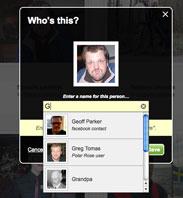
PolarRoseToday I stumbled over a company called Polar Rose that specialize in recognition of peoples faces on pictures. Current use is tagging people on Facebook pictures, but really, this technology could make Data Matching, Identity Resolution and Deduplication better.
We already know fuzzy matching with names and addresses have plenty of challenges with false positives and false negatives. Surely I also do imaging same issues with facial recognition. But we also know from comparing with strings that the more different information we may gather, the better we are at avoiding false matching. So combining fuzzy string matching and facial recognition (where picture is available) could add more human mimic to matching technology reliability.

Right now I am considering whether to add this feature to Data Quality 2.0 or leave it for Data Quality 3.0.

Master Data Quality: The When Dimension

Often we use the who, what and where terms in defining master data opposite to transaction data, like saying:

  • Transaction data accurately identifies who, what, where and when and
  • Master data accurately describes who, what and where

Who is easily related to our business partners, what to the products we sell, buy and use – where is the locations of the events.

In some industries when is also easily related to master data entities like in public transportation a time table valid for a given period. Also a fiscal year in financial reporting belongs to the when side of things.

But when is also a factor in improving and preventing data quality related to our business partners, products and locations and assigned categories because the description of these entities do change over time.

This fact is named as “slowly changing dimensions” when building data warehouses and attempting to make sense of data with business intelligence.

But also in matching, deduplication and identity resolution the “when” dimension matters. Having data with the finest actuality doesn’t necessary lead to a good match as you may compare with data not having the same actuality. Here history tracking is a solution by storing former names, addresses, phones, e-mail addresses, descriptions, roles and relations.

Clouds_and_their_shadowsSuch a complexity is often not handled in master data containers around – and even less in matching environments.

My guess is that the future will bring public accessible reference data in the cloud describing our master data entities with a rich complexity including the when – the time – dimension and capable matching environments around.

Bookmark and Share

The art of Business Directory Matching

A business directory is a list of companies in a given area and perhaps a given industry. One very useful type of such a directory related to data quality is a list of all companies in a given country. In many countries the authorities maintains such a list, other places it’s a matter of assembling local lists or other forms of data capture. Many private service providers offer such lists often with added information value of different kinds.

If you take the customer/prospect master table from an enterprise doing B2B in a given country one should believe that the rows in that table would match 100% to the business directory of that country. I am not talking about that all data are spelled exactly as in the directory but “only” about that it’s the same real world object reflected.

neural1During many years of providing solutions for business directory match and tuning these as well as handling such match services from colleagues in the business I have very, very seldom seen a 100% match – even 90% matches are very rare.

Why is that so? Some of the reasons – related to the classic data quality dimensions – I have stumbled over has been:

Completeness of business directories varies from country to country and between the lists provided by vendors. Some countries like those of the old Czechoslovakia, some English speaking countries in the Pacifics, the Nordics and others have a tight registration and then it is less tight from countries in North America, other European countries and the rest of the world.

Actuality in business directories also differs a lot. Also it is important if the business directory covers dissolved entities and includes history tracking like former names and addresses. Then take the actuality of the customer/prospect table to be matched and once again the time dimension has a lot to say.

Validity, accuracy, consistency both concerning the directory and the table to be matched is a natural course of mismatch. Also many B2B customer/prospect tables holds a lot of entities not being a formal business entity but being a lot of other types of party master data.

Uniqueness may be different defined in the directory and table to be matched. This includes the perception of hierachies of legal entities and branches – not at least governmental and local authority bodies is a fuzzy crowd. Also different roles as those of a small business owner makes challenges. The same is true about roles as franchise takers and the use of trading styles.

Then of course the applied automated match technique and the human interaction executed are factors of the resulting match rate and the quality of the match measured as frequency of false positives.